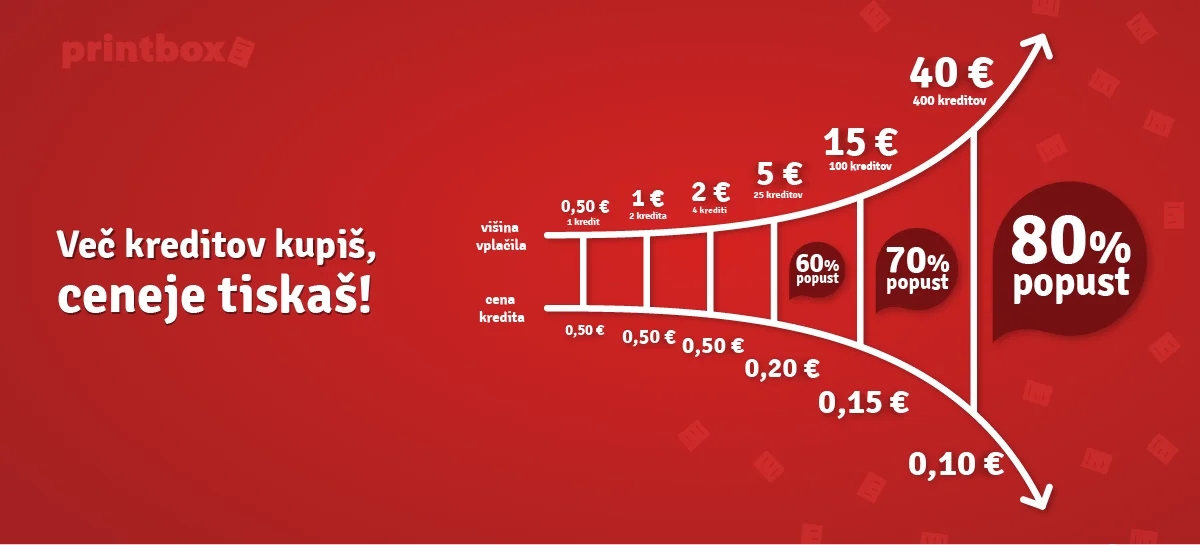
You need Printbox credits to print. The printing price varies depending on the type of location.
All support services of the Printbox system, such as archiving, file uploading, use of Printbox tools, etc. are completely free. You only pay for printing.
Use of Printbox services is based on a prepaid system. If you do not have Printbox credits in your Printbox user account, you need to buy a corresponding number of Printbox credits before printing.
You may purchase Printbox credits at any Printbox kiosk (with cash or NFC) or with online purchase, mobile app. and bank transfer. Some Printbox machines also have an NFC reader and allow you to purchase credits with all NFC devices.
The system at Printbox kiosk accepts banknotes of 5 €, 10 € and 20 €, and coins of 0.05 €, 0.10 €, 0.20 €, 0.5 €, 1 € and 2 €.
The minimum purchase amount for payment with bank transfer is 10,00 EUR or 67 Printbox credits. The minimum purchase amount for payment with credit cards is 1,00 EUR or 2 Printbox credits. Minimum purchase amount for payment at Printbox kiosk is 0,50 EUR or 1 Printbox credit (referring to cash payment, NFC payment).
Printbox does not return change!
It is recommended to use a Printbox user account, where the credits are stored and can be used later, or to pay the exact amount of money for printing.
NFC reader on selected kiosks
Online payment from user account
Bills/coins on all kiosks
Transfer to the company’s current account
Transfer the desired amount of purchase to our bank account (minimum amount is 10€). After the transfer has been carried out, send us a proof of payment to info@printbox.net. Make sure you state the data of the user account for which the Printbox printing credit was purchased.
Our business account:
Bank: NLB d.d.
BIC code: LJBASI2X
IBAN: SI56 0284 3026 4793 496
Printbox kiosk does not issue invoices for its services.
In accordance with Article 143 of the Rules on the implementation of the Value Added Tax Act, Exemptions from invoicing obligation (ZDDV-1_PIZDDV-NPB14), Printbox does not issue invoices for its services.
If you wish to receive an invoice for the Printbox printing credits that you have purchased, send us an e-mail to info@printbox.net with the following information.
After successful verification of payment, the invoice will be sent to the specified e-mail address.
Purchase of Printbox credits with payment cards can be done at web site sl.printbox.net. Sign into your Printbox account ant choose BUY CREDITS within left menu. Click on »Credit card payment« to start with step one where you insert the number of needed Printbox credits or amount of payment. In case you insert number of needed Printbox credits the system will automatically display purchase amount. In case you insert amount of purchase the system will automatically display the number of Printbox credits for particular purchase amount.
In the next step you need to insert details of your credit card (valid card number, expiration date and CVC code) and click on »Pay with your card« to confirm purchase. You may review your online purchase and history of all your payment history in FILLUPS menu.
What you need to know about purchasing with credit cards:
address
description